
KVキャッシュ量子化を軽々しく使うとつらい目に遭った
というタイトルで始めたんですけど、気づきは本当に偶然です。GPUSOROBANのインスタンスでllama.cppとLiteLLM連携の検証をしたときに気づいた話です。
KVキャッシュというものがあるという話を以前書きました。
llama.cppでは、-ctv, -ctk という引数を使用してllama-serverを起動することでこれを反映することができます。実にKVキャッシュ量子化の設定値は様々あったのですが、q4_1を選択したときのことです。試しにブロック崩しでも作って遊ぼうかと思ったら、ちょっと挙動が「遅すぎる」のです。
ついでにパフォーマンスも取ろうとして、値をとってみるとこうなりました。うそでしょ・・・GPUはNVIDIA A4000使ってるんすよ?
prompt eval time =   47643.52 ms /  7368 tokens (    6.47 ms per token,   154.65 tokens per second)
       eval time =  148486.27 ms /  3610 tokens (   41.13 ms per token,    24.31 tokens per second)
total time = 196129.79 ms / 10978 tokens最初、冗談でしょ?と思ってターンを重ねていくにつれどんどんパフォーマンスが落ちていって上記のようなパフォーマンスまで落ち込みました。これちょっとおかしくね?ってことで、調べてみたわけです。で、行きついたのがKVキャッシュの量子化でした。この量子化設定を q8_0 に変更したらこうなりました。同じく3ターン目終了後の動きです。
prompt eval time =    2164.10 ms /  7262 tokens (    0.30 ms per token,  3355.67 tokens per second)
       eval time =   60827.03 ms /  4224 tokens (   14.40 ms per token,    69.44 tokens per second)
total time = 62991.13 ms / 11486 tokensもちろんなぜこんなに差が出るのか気になるところでして、調べることにしてみたのが今回の記事です。
速度の比較をしてみたよ
というわけで、とりあえず速度の比較をしてみましょう。以下の3パターンで行いました。
- q8_0の場合
- q4_0の場合
- 問題になったq4_1の場合
それぞれのケースで、以下のような順序で質問を重ねるようにしました。
- ブロック崩しが遊べるJavaScriptコードを書いてほしい。HTMLに張り付ける形で。
- もっとかっこよくしてほしいな!
- ボールの動きが画面サイズに対して速すぎる気がするんだ。ちょっぴりだけゆっくり目にしてほしいな!
そして、ターンごとに帰ってくるときの「プロンプト読み込み」と「回答出力」にかかる秒間当たりのトークン数を基準に表にまとめた感じです。
| ターン | 処理フェーズ | KVキャッシュ 量子化モード (tokens/sec) | ||
|---|---|---|---|---|
| q4_0 (問題ない) |
q8_0 (問題ない) |
q4_1 (問題発生) |
||
| ターン 1 | プロンプト処理 (Prompt Eval) |
243.73 | 241.05 | 217.09 |
| テキスト生成 (Eval) |
77.15 | 78.57 | 44.38 | |
| ターン 2 | プロンプト処理 (Prompt Eval) |
3391.16 | 3408.58 | 254.38 |
| テキスト生成 (Eval) |
72.28 | 73.24 | 30.76 | |
| ターン 3 | プロンプト処理 (Prompt Eval) |
3491.52 | 3355.67 | 154.65 |
| テキスト生成 (Eval) |
70.31 | 69.44 | 24.31 | |
はい、2ターン目から速攻えらいことになっているわけですが、CPU使用率を見てもその違いが明らかだったので追加で載せます。
| KVキャッシュ 量子化モード |
CPU 使用率 (topコマンド %CPU) |
GPU 使用率 (nvidia-smi Volatile GPU-Util) |
GPU 消費電力 (最大140W) |
|---|---|---|---|
| q4_0 (問題なし) |
100.0 % | 96 % | 139W |
| q4_1 (問題あり) |
451.3 % | 57 % | 122W |
つまりはどうやら、q4_0では全部GPUが処理してくれたのに対して、q4_1ではGPUが半分強ぐらいしか稼働しておらず、なぜかCPUががっつり動いているということが分かります。
このことから、どうもCPUがボトルネックになったせいでパフォーマンスが大幅に劣化したのだろうと考えられます。なぜこれが起きたのかを調べてみました。
AIにログをチェックしてもらったよ(Powered by GeminiPro)
実はログをパッと見てわかるような違いはありませんでした。そのため、一度ログを一式放り込んだうえで、Geminiに対して解析を依頼しました。結果として以下の相違点があることを知ることができました。
q4_0の場合
sched_reserve: graph nodes  = 2263
sched_reserve: graph splits = 2q4_1の場合
sched_reserve: graph nodes  = 2263
sched_reserve: graph splits = 86graph splitsの値がq4_1の場合非常に多くなっています。このgraphとは何でしょうか?
GPU->CPUフォールバックが起きると、graph splits値が嵩む
deepwikiで確認したところ、
- graph nodesは計算グラフ内のノード(演算操作)の総数を示す
- graph splitsは計算グラフが複数のバックエンドに分割された数を示す
ということが分かりました。また、さらに確認を進めてみると、flash_attn_base.glsl:132-149 にてFlash Attentionを使用した場合の戦略に違いがみられることが分かりました。
// q4_0: スケールのみ
return FLOAT_TYPE(k_packed.k_data_packed16[a_offset + ib].d) * (nibbles - FLOAT_TYPE(8.0f));

// q4_1: スケール+最小値
return FLOAT_TYPE(k_packed.k_data_packed16[a_offset + ib].d) * nibbles + FLOAT_TYPE(k_packed.k_data_packed16[a_offset + ib].m);スケールのみの計算である場合、その処理はFlashAttentionで完結するようなのですが、これに最小値の加算が加わった場合、一部の操作がCPUにオフロード(いわゆるフォールバック)が起きることが回答として得られました。そのため、GPUは本来の力が発揮できず、CPUに負担がかかり、この時の処理がボトルネックになって大幅に処理速度が低下したようです。
フォールバックが発生するたびにgraphデータの分割回数は多くなり、結果として先述したような graph splits数に大きく跳ね返ってしまったようです。LLMやSLMは主に推論に1本線のロジックが用いられます。それゆえに、どこか一部でもCPU処理が挟まった場合、その処理速度は完全にCPUのそれ相当まで落ち込むことになります。今回大幅に速度低下したのは、CPU処理速度と同等のパフォーマンスしか発揮できない状況に陥ったということが言えそうです。
FlashAttention向けに最適化された量子化レベル
これを設定するにはそれでは、何を選択したらいいのでしょう?どうやら、以下のようです。
| 量子化モード | 概要 |
|---|---|
| f16 | デフォルト設定。最も精度が高く、最も高速に動作します。VRAM消費は最大です。 |
| q8_0 | 一番の推奨。 VRAM使用量を f16 のほぼ半分にしつつ、精度劣化が極めて少なく(ほぼロスレス)、処理速度も f16 と同等に高速です。 |
| q4_0 | VRAMを極限まで節約したい場合の選択肢。 VRAM消費は f16 の1/4になりますが、精度(特に長文コンテキスト時の推論能力など)に若干の劣化が見られることがあります。 |
つまり、設定するならq8_0かq4_0のどっちかにしとけ・・ということのようです。KVキャッシュは過去に執筆した記事にもあるように、LLM/SLMが動作するうえで欠かせないものです。その点をしっかり感が見たうえでできる処理は極力GPUに全部乗っけるというのが個人的には肝要なところなんじゃないかなーという気がします。
余談
なお、ブロック崩しを作らせてみると、それなりのものが出来ました。Gemma-4-E4Bというモデルで作らせたんですが、それなりのものでしたよ。
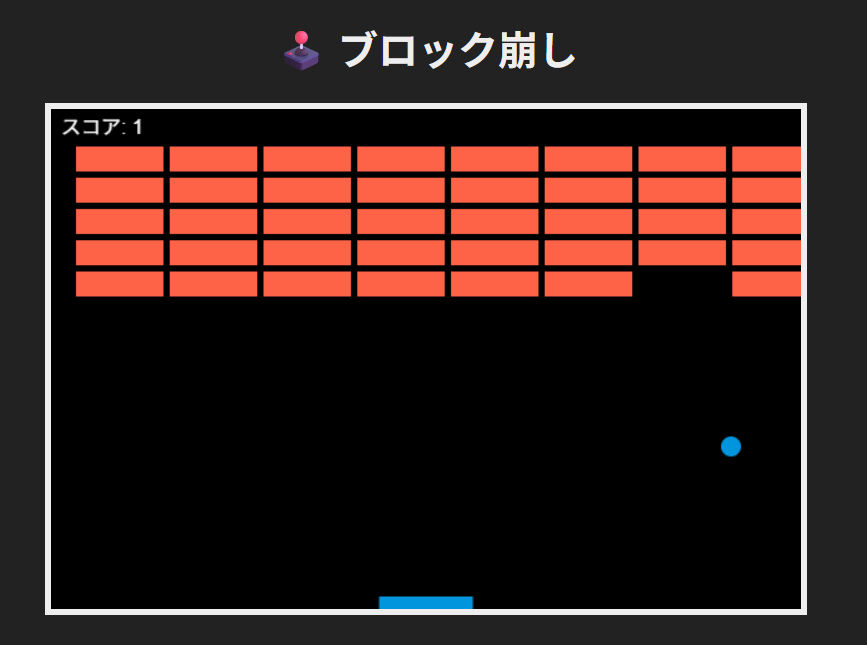
HTMLファイル作ってそこに困難貼り付けたら一応動くようです。ちょっと玉のスピードが速いのと、待ったなしでゲームが開始するのが玉に瑕ですけど。コメントのつけ方がどこかGeminiっぽい癖を持っていて、それはそれで面白いなと思いました。
<!DOCTYPE html>
<html lang="ja">
<head>
    <meta charset="UTF-8">
    <title>Block Breaker Game (Menu)</title>
    <style>
        body {
            display: flex;
            justify-content: center;
            align-items: center;
            flex-direction: column;
            height: 100vh;
            background-color: #222;
            margin: 0;
            font-family: sans-serif;
        }
        canvas {
            border: 5px solid #eee;
            background-color: #000;
        }
        h1 {
            color: #eee;
        }
    </style>
</head>
<body >

    <h1 id="gameTitle">🕹️ ブロック崩し</h1>
    <canvas id="gameCanvas" width="600" height="400"></canvas>

    <script>
        // =====================================================
        // 🎮 ゲーム設定と初期化
        // =====================================================
        const canvas = document.getElementById('gameCanvas');
        const ctx = canvas.getContext('2d');
        const gameTitleElement = document.getElementById('gameTitle');

        // ゲームの状態変数: 'menu' -> 'playing' -> 'over' or 'won'
        let gameState = 'menu';
        let score = 0;

        // パドルの設定
        const paddleHeight = 10;
        const paddleWidth = 75;
        let paddleX = (canvas.width - paddleWidth) / 2;
        let paddleSpeed = 7;

        // ボールの設定
        const ballRadius = 8;
        let ballX = canvas.width / 2;
        let ballY = canvas.height - 30;
        let ballSpeedX = 4;
        let ballSpeedY = -4;

        // ブロックの設定
        const brickRowCount = 5;
        const brickColumnCount = 8;
        const brickWidth = 70;
        const brickHeight = 20;
        const brickPadding = 5;
        const brickOffsetTop = 30;
        const brickOffsetLeft = 20;

        // ブロック配列の作成
        let bricks = [];
        for (let r = 0; r < brickRowCount; r++) {
            bricks[r] = [];
            for (let c = 0; c < brickColumnCount; c++) {
                bricks[r][c] = { x: 0, y: 0, status: 1 };
            }
        }

        // キー入力の追跡
        let rightPressed = false;
        let leftPressed = false;

        // =====================================================
        // 🎨 描画関数 (Drawing Functions)
        // =====================================================

        function drawBall() {
            ctx.beginPath();
            ctx.arc(ballX, ballY, ballRadius, 0, Math.PI * 2);
            ctx.fillStyle = "#0095DD";
            ctx.fill();
            ctx.closePath();
        }

        function drawPaddle() {
            ctx.beginPath();
            ctx.rect(paddleX, canvas.height - paddleHeight, paddleWidth, paddleHeight);
            ctx.fillStyle = "#0095DD";
            ctx.fill();
            ctx.closePath();
        }

        function drawBricks() {
            for (let r = 0; r < brickRowCount; r++) {
                for (let c = 0; c < brickColumnCount; c++) {
                    const brick = bricks[r][c];
                    if (brick.status === 1) {
                        brick.x = (c * (brickWidth + brickPadding)) + brickOffsetLeft;
                        brick.y = (r * (brickHeight + brickPadding)) + brickOffsetTop;

                        ctx.beginPath();
                        ctx.rect(brick.x, brick.y, brickWidth, brickHeight);
                        ctx.fillStyle = "#FF6347";
                        ctx.fill();
                        ctx.closePath();
                    }
                }
            }
        }

        function drawScore() {
            ctx.font = "16px Arial";
            ctx.fillStyle = "#FFF";
            ctx.fillText("スコア: " + score, 8, 20);
        }

        // --- 新規: メニュー画面描画 ---
        function drawMenuScreen() {
            // 画面全体を暗い色で背景として描画
            ctx.fillStyle = "#000";
            ctx.fillRect(0, 0, canvas.width, canvas.height);

            ctx.font = "30px Arial";
            ctx.fillStyle = "#FFF";
            ctx.textAlign = "center";
            ctx.fillText("🚀 ブロック崩し", canvas.width / 2, 100);

            ctx.font = "18px Arial";
            ctx.fillText("------------------------", canvas.width / 2, 150);

            ctx.fillText("【操作方法】", canvas.width / 2, 200);
            ctx.fillText("←/→キーでパドルを左右に移動", canvas.width / 2, 230);
            ctx.fillText("スペースキーまたはEnterでゲームスタート", canvas.width / 2, 260);

            ctx.font = "20px Arial";
            ctx.fillText("ゲーム開始を待機中...", canvas.width / 2, 320);

            ctx.textAlign = "left"; // 元に戻す
        }


        function drawGameOverScreen(message, color) {
            ctx.fillStyle = "#000";
            ctx.fillRect(0, 0, canvas.width, canvas.height);

            ctx.font = "40px Arial";
            ctx.fillStyle = color;
            ctx.textAlign = "center";
            ctx.fillText(message, canvas.width / 2, canvas.height / 2 - 40);
            ctx.fillText(`最終スコア: ${score}`, canvas.width / 2, canvas.height / 2 + 20);
            ctx.textAlign = "left";
        }

        // =====================================================
        // 🔄 更新ロジック (Update Logic & Collision)
        // =====================================================

        function collisionDetection() {
            for (let r = 0; r < brickRowCount; r++) {
                for (let c = 0; c < brickColumnCount; c++) {
                    const brick = bricks[r][c];
                    if (brick.status === 1) {
                        const brickX = brick.x;
                        const brickY = brick.y;
                        const brickW = brickWidth;
                        const brickH = brickHeight;

                        if (ballX > brickX && ballX < brickX + brickW && ballY > brickY && ballY < brickY + brickH) {
                            ballSpeedY = -ballSpeedY;
                            brick.status = 0;
                            score++;
                        }
                    }
                }
            }
        }

        function updatePaddle() {
            if (rightPressed && paddleX < canvas.width - paddleWidth) {
                paddleX += paddleSpeed;
            } else if (leftPressed && paddleX > 0) {
                paddleX -= paddleSpeed;
            }
        }

        function updateBall() {
            ballX += ballSpeedX;
            ballY += ballSpeedY;

            // 1. 壁の衝突判定
            if (ballX + ballRadius > canvas.width || ballX - ballRadius < 0) {
                ballSpeedX = -ballSpeedX;
            }
            if (ballY - ballRadius < 0) {
                ballSpeedY = -ballSpeedY;
            }
            // 2. パドルの衝突判定
            if (ballY + ballRadius > canvas.height - paddleHeight &&
                ballX > paddleX &&
                ballX < paddleX + paddleWidth &&
                ballSpeedY > 0) {

                ballSpeedY = -ballSpeedY;
            }

            // 3. ゲームオーバー判定
            if (ballY + ballRadius > canvas.height) {
                gameState = 'over';
            }
        }

        function checkWinCondition() {
            let remainingBricks = 0;
            for (let r = 0; r < brickRowCount; r++) {
                for (let c = 0; c < brickColumnCount; c++) {
                    if (bricks[r][c].status === 1) {
                        remainingBricks++;
                    }
                }
            }

            if (remainingBricks === 0 && gameState === 'playing') {
                gameState = 'won';
            }
        }

        // =====================================================
        // 🔄 メインループ (Game Loop)
        // =====================================================

        function draw() {
            // 常にキャンバスをクリア
            ctx.clearRect(0, 0, canvas.width, canvas.height);

            // 状態によって描画と更新の処理を分岐
            if (gameState === 'menu') {
                drawMenuScreen();
            } else if (gameState === 'playing') {
                // ゲームプレイ中の描画
                drawBricks();
                drawBall();
                drawPaddle();
                drawScore();

                // ゲームプレイ中のロジック更新
                collisionDetection();
                updatePaddle();
                updateBall();
                checkWinCondition();

            } else if (gameState === 'over' || gameState === 'won') {
                // 終了時の描画
                if (gameState === 'over') {
                    drawGameOverScreen("💥 ゲームオーバー!", "red");
                } else if (gameState === 'won') {
                    drawGameOverScreen("🎉 クリアおめでとう! 🎉", "lime");
                }
            }

            // 次のフレームをリクエスト (常に実行し、アニメーションを維持)
            requestAnimationFrame(draw);
        }

        // =====================================================
        // ⌨️ キーボードイベント処理
        // =====================================================

        document.addEventListener("keydown", keyDownHandler, false);
        document.addEventListener("keyup", keyUpHandler, false);

        function keyDownHandler(e) {
            // 1. メニュー画面からのスタート判定
            if (gameState === 'menu') {
                if (e.key === " " || e.key === "Enter") {
                    gameState = 'playing';
                    // ゲーム開始時にボールを中央に戻す処理 (任意)
                    ballX = canvas.width / 2;
                    ballY = canvas.height - 30;
                    ballSpeedX = 4;
                    ballSpeedY = -4;
                }
            }
            // 2. ゲームプレイ中の移動判定
            else if (gameState === 'playing') {
                if (e.key === "Right" || e.key === "ArrowRight") {
                    rightPressed = true;
                } else if (e.key === "Left" || e.key === "ArrowLeft") {
                    leftPressed = true;
                }
            }
        }

        function keyUpHandler(e) {
            // ゲームプレイ中の移動解除
            if (gameState === 'playing') {
                if (e.key === "Right" || e.key === "ArrowRight") {
                    rightPressed = false;
                } else if (e.key === "Left" || e.key === "ArrowLeft") {
                    leftPressed = false;
                }
            }
        }

        // ゲーム開始!
        draw();
    </script>

</body >
</html>なお、GPT-5.4でこれを作らせたらもっときれいでしたので、参考まで。
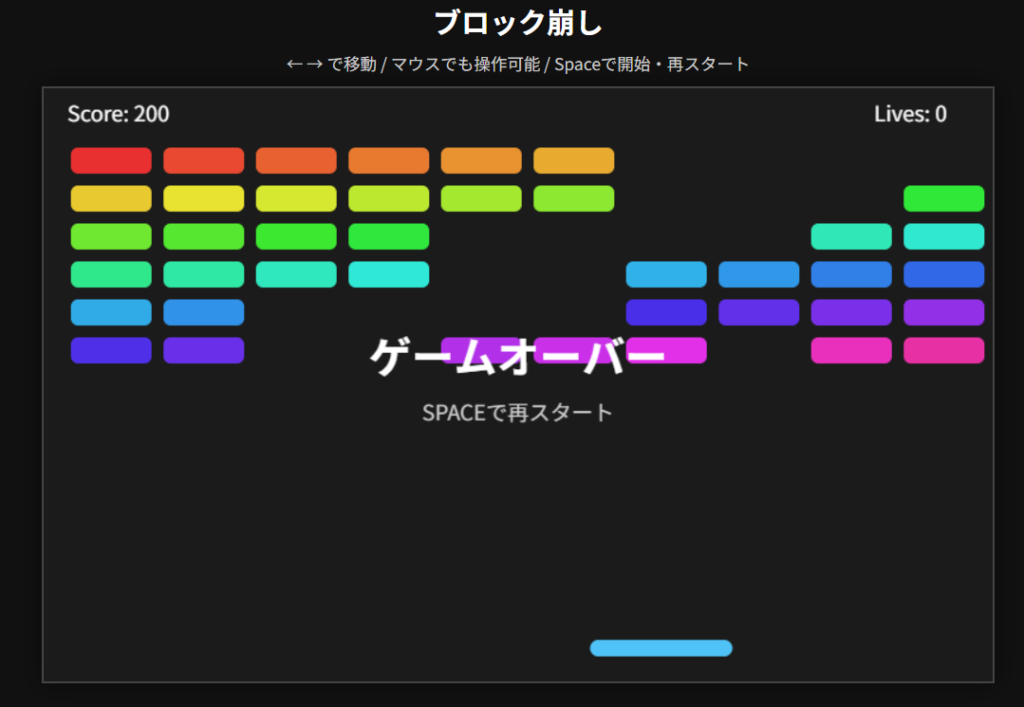
ソースは以下の通りです。
<!DOCTYPE html>
<html lang="ja">
<head>
  <meta charset="UTF-8" />
  <meta name="viewport" content="width=device-width, initial-scale=1.0" />
  <title>ブロック崩し</title>
  <style>
    body {
      margin: 0;
      background: #111;
      color: #fff;
      font-family: sans-serif;
      display: flex;
      justify-content: center;
      align-items: center;
      min-height: 100vh;
      flex-direction: column;
    }

    h1 {
      margin: 12px 0 8px;
      font-size: 24px;
    }

    .info {
      margin-bottom: 10px;
      font-size: 14px;
      color: #ccc;
    }

    canvas {
      background: #1b1b1b;
      border: 2px solid #444;
      box-shadow: 0 0 20px rgba(0,0,0,0.5);
    }
  </style>
</head>
<body>
  <h1>ブロック崩し</h1>
  <div class="info">← → で移動 / マウスでも操作可能 / Spaceで開始・再スタート</div>
  <canvas id="gameCanvas" width="800" height="500"></canvas>

  <script>
    const canvas = document.getElementById("gameCanvas");
    const ctx = canvas.getContext("2d");

    const state = {
      running: false,
      gameOver: false,
      gameClear: false,
      score: 0,
      lives: 3
    };

    const paddle = {
      width: 120,
      height: 14,
      x: canvas.width / 2 - 60,
      y: canvas.height - 35,
      speed: 8,
      dx: 0
    };

    const ball = {
      x: canvas.width / 2,
      y: canvas.height - 55,
      radius: 9,
      speed: 5,
      dx: 4,
      dy: -4
    };

    const brick = {
      rowCount: 6,
      colCount: 10,
      width: 68,
      height: 22,
      padding: 10,
      offsetTop: 50,
      offsetLeft: 23
    };

    let bricks = [];

    function initBricks() {
      bricks = [];
      for (let r = 0; r < brick.rowCount; r++) {
        bricks[r] = [];
        for (let c = 0; c < brick.colCount; c++) {
          bricks[r][c] = {
            x: 0,
            y: 0,
            status: 1,
            color: `hsl(${r * 50 + c * 8}, 80%, 55%)`
          };
        }
      }
    }

    function resetBallAndPaddle() {
      paddle.x = canvas.width / 2 - paddle.width / 2;
      ball.x = canvas.width / 2;
      ball.y = canvas.height - 55;
      ball.dx = (Math.random() > 0.5 ? 1 : -1) * ball.speed * 0.8;
      ball.dy = -ball.speed;
    }

    function resetGame() {
      state.running = false;
      state.gameOver = false;
      state.gameClear = false;
      state.score = 0;
      state.lives = 3;
      initBricks();
      resetBallAndPaddle();
    }

    function drawBall() {
      ctx.beginPath();
      ctx.arc(ball.x, ball.y, ball.radius, 0, Math.PI * 2);
      ctx.fillStyle = "#ffd54a";
      ctx.fill();
      ctx.closePath();
    }

    function drawPaddle() {
      ctx.beginPath();
      ctx.roundRect(paddle.x, paddle.y, paddle.width, paddle.height, 8);
      ctx.fillStyle = "#4fc3f7";
      ctx.fill();
      ctx.closePath();
    }

    function drawBricks() {
      for (let r = 0; r < brick.rowCount; r++) {
        for (let c = 0; c < brick.colCount; c++) {
          const b = bricks[r][c];
          if (b.status === 1) {
            const brickX = c * (brick.width + brick.padding) + brick.offsetLeft;
            const brickY = r * (brick.height + brick.padding) + brick.offsetTop;
            b.x = brickX;
            b.y = brickY;

            ctx.beginPath();
            ctx.roundRect(brickX, brickY, brick.width, brick.height, 6);
            ctx.fillStyle = b.color;
            ctx.fill();
            ctx.closePath();
          }
        }
      }
    }

    function drawHUD() {
      ctx.fillStyle = "#fff";
      ctx.font = "18px sans-serif";
      ctx.fillText(`Score: ${state.score}`, 20, 28);
      ctx.fillText(`Lives: ${state.lives}`, canvas.width - 100, 28);
    }

    function drawCenterText(title, subtitle) {
      ctx.fillStyle = "#fff";
      ctx.textAlign = "center";
      ctx.font = "bold 36px sans-serif";
      ctx.fillText(title, canvas.width / 2, canvas.height / 2 - 10);
      ctx.font = "18px sans-serif";
      ctx.fillStyle = "#ccc";
      ctx.fillText(subtitle, canvas.width / 2, canvas.height / 2 + 30);
      ctx.textAlign = "start";
    }

    function movePaddle() {
      paddle.x += paddle.dx;

      if (paddle.x < 0) paddle.x = 0;
      if (paddle.x + paddle.width > canvas.width) {
        paddle.x = canvas.width - paddle.width;
      }
    }

    function moveBall() {
      ball.x += ball.dx;
      ball.y += ball.dy;

      // 左右の壁
      if (ball.x - ball.radius < 0) {
        ball.x = ball.radius;
        ball.dx *= -1;
      }
      if (ball.x + ball.radius > canvas.width) {
        ball.x = canvas.width - ball.radius;
        ball.dx *= -1;
      }

      // 上の壁
      if (ball.y - ball.radius < 0) {
        ball.y = ball.radius;
        ball.dy *= -1;
      }

      // パドルとの衝突
      if (
        ball.y + ball.radius >= paddle.y &&
        ball.y + ball.radius <= paddle.y + paddle.height &&
        ball.x >= paddle.x &&
        ball.x <= paddle.x + paddle.width &&
        ball.dy > 0
      ) {
        const hitPos = (ball.x - (paddle.x + paddle.width / 2)) / (paddle.width / 2);
        ball.dx = hitPos * 6;
        ball.dy = -Math.abs(ball.dy);
        ball.y = paddle.y - ball.radius;
      }

      // 下に落ちた
      if (ball.y - ball.radius > canvas.height) {
        state.lives--;
        if (state.lives <= 0) {
          state.gameOver = true;
          state.running = false;
        } else {
          state.running = false;
          resetBallAndPaddle();
        }
      }
    }

    function collisionDetection() {
      let remaining = 0;

      for (let r = 0; r < brick.rowCount; r++) {
        for (let c = 0; c < brick.colCount; c++) {
          const b = bricks[r][c];
          if (b.status === 1) {
            remaining++;

            if (
              ball.x > b.x &&
              ball.x < b.x + brick.width &&
              ball.y > b.y &&
              ball.y < b.y + brick.height
            ) {
              b.status = 0;
              ball.dy *= -1;
              state.score += 10;
              remaining--;
            }
          }
        }
      }

      if (remaining === 0) {
        state.gameClear = true;
        state.running = false;
      }
    }

    function draw() {
      ctx.clearRect(0, 0, canvas.width, canvas.height);

      drawBricks();
      drawBall();
      drawPaddle();
      drawHUD();

      if (!state.running && !state.gameOver && !state.gameClear) {
        drawCenterText("SPACEでスタート", "ボールが落ちた後もSPACEで再開");
      }

      if (state.gameOver) {
        drawCenterText("ゲームオーバー", "SPACEで再スタート");
      }

      if (state.gameClear) {
        drawCenterText("クリア!", "SPACEで再スタート");
      }
    }

    function update() {
      if (state.running) {
        movePaddle();
        moveBall();
        collisionDetection();
      }
      draw();
      requestAnimationFrame(update);
    }

    document.addEventListener("keydown", (e) => {
      if (e.code === "ArrowRight") {
        paddle.dx = paddle.speed;
      } else if (e.code === "ArrowLeft") {
        paddle.dx = -paddle.speed;
      } else if (e.code === "Space") {
        e.preventDefault();
        if (state.gameOver || state.gameClear) {
          resetGame();
        } else {
          state.running = true;
        }
      }
    });

    document.addEventListener("keyup", (e) => {
      if (e.code === "ArrowRight" || e.code === "ArrowLeft") {
        paddle.dx = 0;
      }
    });

    canvas.addEventListener("mousemove", (e) => {
      const rect = canvas.getBoundingClientRect();
      const mouseX = e.clientX - rect.left;
      paddle.x = mouseX - paddle.width / 2;

      if (paddle.x < 0) paddle.x = 0;
      if (paddle.x + paddle.width > canvas.width) {
        paddle.x = canvas.width - paddle.width;
      }
    });

    // roundRect未対応ブラウザ向け簡易フォールバック
    if (!CanvasRenderingContext2D.prototype.roundRect) {
      CanvasRenderingContext2D.prototype.roundRect = function (x, y, w, h, r) {
        this.beginPath();
        this.moveTo(x + r, y);
        this.lineTo(x + w - r, y);
        this.quadraticCurveTo(x + w, y, x + w, y + r);
        this.lineTo(x + w, y + h - r);
        this.quadraticCurveTo(x + w, y + h, x + w - r, y + h);
        this.lineTo(x + r, y + h);
        this.quadraticCurveTo(x, y + h, x, y + h - r);
        this.lineTo(x, y + r);
        this.quadraticCurveTo(x, y, x + r, y);
        this.closePath();
      };
    }

    resetGame();
    update();
  </script>
</body>
</html>推論レベルがやっぱり2-3枚ぐらいは上手なのかも。ほんと、いろんなモデルを使って作らせてみると面白いですね、これ。

コメント